A browser-based tool to hide and recover secret text inside images — fully client-side, nothing leaves your device.
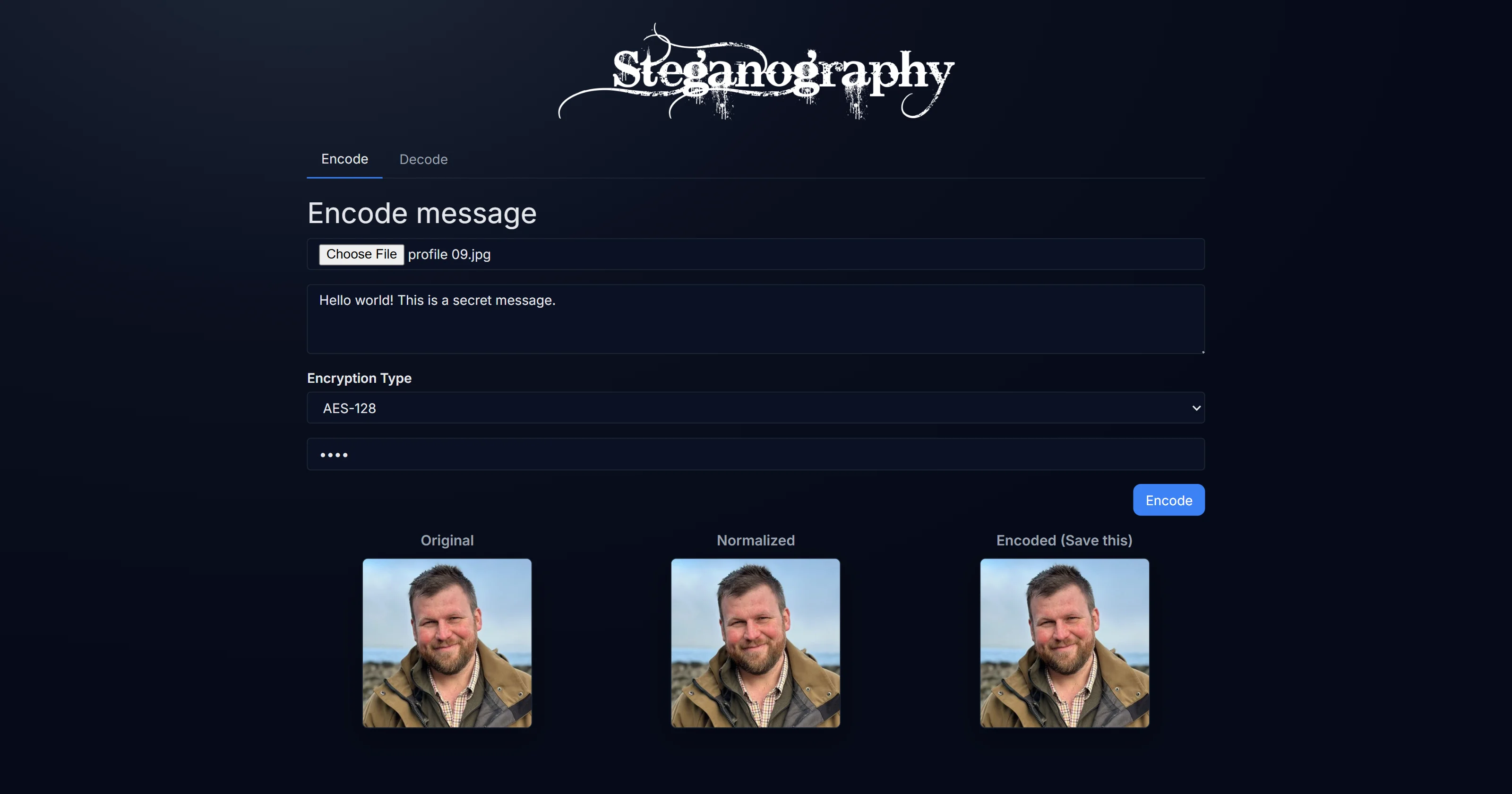
Steganography is a browser tool that hides arbitrary text inside an image by modifying the least significant bits of individual pixel channels — changes so small they are invisible to the human eye. The resulting image looks identical to the original. The secret can only be recovered if you know where to look. Everything runs in your browser; no server ever sees your data or your image.
Overview
LSB (Least Significant Bit) steganography is one of the oldest and cleanest methods for hiding information in plain sight. Each pixel in an RGB image stores three channels (red, green, blue) as 8-bit values. Flipping only the last bit of a channel changes its value by 1 out of 255 — a difference no eye can detect. By distributing the bits of a text message across many pixels in sequence, you can store hundreds of characters in a typical photo with zero perceptible quality change.
This tool implements the full encode and decode cycle entirely in the browser using the Canvas API. Drop in an image, type your message, download the stego image. Share it anywhere. To recover the message, drop the same image into the decode tab.
Visit trysteg.vercel.app, drop an image, type a secret message, and download the encoded PNG. To recover it, switch to the Decode tab and drop the same file. Enable AES-128 mode to password-protect the message before embedding.
The page loads once. After that, it works with no internet connection. Your images and your messages are processed in-memory in the browser and never transmitted to any server.
How LSB Steganography Works
Encoding:
Each character in the message is converted to its ASCII value, then to 8 binary bits. Those bits are written into the least significant bit of consecutive pixel channels across the image.
Message: "Hi"
H → 72  → 01001000
i → 105 → 01101001
For each bit, the target pixel channel's last bit is set to match:
// Write a single bit into the LSB of a pixel channel value
function writeBit(channelValue, bit) {
  return (channelValue & 0b11111110) | bit
}
Before the message bits, the encoder writes a structured binary header: a STEG1 magic marker (40 bits), an 8-bit algorithm ID (0 = plaintext, 1 = AES-128), and a 32-bit payload length. The decoder reads this header first — if the magic marker is absent, it reports "No hidden message found" rather than attempting to decode garbage.
Bitstream layout:
[MAGIC: 40 bits — "STEG1"] [algId: 8 bits] [payloadLen: 32 bits] [payload bits]
Decoding:
The decode pass reads the header first to validate the magic marker and read the payload length, then extracts exactly that many bytes from the LSBs. If algId is 1, the payload is passed to AES-GCM decryption before converting to text.
Features
| Feature | Details |
|---|---|
| LSB encode | Embeds text into an image by modifying the least significant bit of pixel channels |
| LSB decode | Recovers the hidden message from any stego image produced by the encoder |
| AES-128-GCM encryption | Optional password protection — message encrypted before embedding via Web Crypto API |
| Password-protected decode | Decoder prompts for password when algId signals encrypted payload; wrong password fails gracefully |
| Canvas API processing | All pixel read/write operations use getImageData / putImageData — no server |
| Lossless output | Exported as PNG to prevent JPEG re-compression from corrupting the hidden bits |
| Zero dependencies | Pure HTML, CSS, and vanilla JavaScript — nothing to install or build |
| Invisible change | Bit-level modifications are below the threshold of human perception |
Encryption Mode
Embedding plaintext is the default, but the tool supports optional AES-128-GCM encryption before embedding. When a password is provided:
- A 16-byte random salt and 12-byte random IV are generated via
window.crypto.getRandomValues - PBKDF2 derives a 128-bit AES key from the password — SHA-256, 100,000 iterations
- AES-GCM encrypts the message; output payload is
salt(16) | iv(12) | ciphertext - That encrypted payload is what gets embedded into the image LSBs
The algId field in the header is set to 1, so the decoder knows to prompt for a password.
script.js
async function aesGcmEncrypt(password, plaintextBytes, bits) {
  const salt = getRandomBytes(16)
  const iv = getRandomBytes(12)
  const key = await deriveAesKeyFromPassword(password, salt, bits)
  const ct = new Uint8Array(
    await window.crypto.subtle.encrypt(
      { name: "AES-GCM", iv },
      key,
      plaintextBytes
    )
  )
  const payload = new Uint8Array(16 + 12 + ct.length)
  payload.set(salt, 0)
  payload.set(iv, 16)
  payload.set(ct, 28)
  return payload
}
Tech Stack
| Tool | Role |
|---|---|
| Vanilla JavaScript | Encoding/decoding logic, Canvas API orchestration |
| Canvas API | getImageData for pixel access, putImageData for writing back modified pixels |
| jQuery | DOM manipulation and UI event wiring |
Web Crypto API (crypto.subtle) | AES-GCM encryption and PBKDF2 key derivation — no external crypto library |
| HTML / CSS | UI — no framework, no build step |
Project Structure
steganography/
├── index.html     # UI — encode/decode tabs, canvas display
├── script.js      # All logic — LSB encoding, AES-GCM encryption, Canvas API
├── styles.css     # Styling
└── images/        # Sample images
Encode / Decode Flow
Select an image (encode)
Drop or select any image. The Canvas API draws it at native resolution and calls getImageData() to expose the raw pixel buffer as a flat Uint8ClampedArray — four values per pixel: R, G, B, A.
Enter your secret message
Type any text. The encoder calculates how many pixels are needed (characters × 8 bits, spread across R/G/B channels) and warns if the image is too small to hold the full message.
Encode and download
Before writing any bits, the encoder zeros out all LSBs across the entire image — creating a "nulled" baseline. The UI shows three canvas states side by side: original, nulled, and encoded. This makes bit-writing deterministic and avoids off-by-one errors from pre-existing odd pixel values. Each payload bit is then written into the LSB of consecutive R, G, B channels. The alpha channel is always left untouched. canvas.toBlob('image/png') produces the output — PNG is non-lossy, so the embedded bits survive exactly as written.
Decode a stego image
Switch to the Decode tab and drop the stego image. The decoder reads the header first — validates the STEG1 magic marker, reads the algId, then extracts exactly payloadLen bytes from the LSBs. If algId is 1, it prompts for a password and decrypts via AES-GCM before displaying the message. A wrong password or a non-stego image both fail gracefully with a clear error.
Limitations and Constraints
JPEG encoding would destroy the embedded bits — the lossy compression rounds pixel values in ways that corrupt the carefully placed LSBs. For this reason, this tool always exports PNG. If a stego PNG is re-saved as JPEG by another tool before decoding, the hidden data will be unrecoverable.
The storage capacity is proportional to image size: a 1000×1000 pixel image has 1,000,000 pixels × 3 channels = 3,000,000 bit positions, which can hold roughly 375,000 characters — far more than any practical message.