A premium footwear e-commerce site with Stripe checkout, animated product browsing, and a real-time cart — built with Next.js 14.
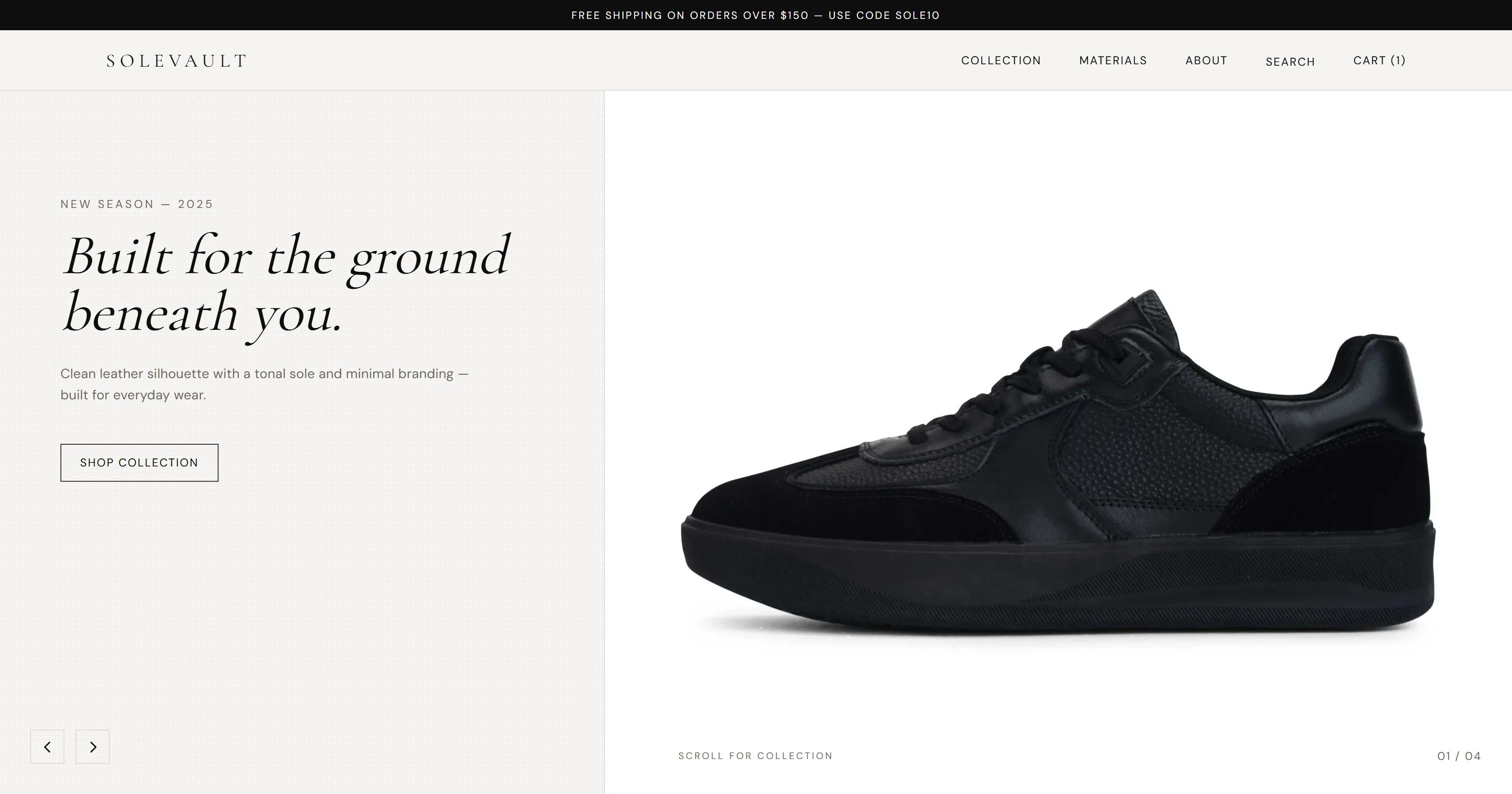
SoleVault is a premium shoe store built to prove that an e-commerce demo can feel as considered as an editorial magazine. The entire shopping flow — hero entry, product discovery, cart management, and Stripe checkout — runs with Framer Motion transitions that never feel bolted-on. The coupon code SOLE10 applies a real 10% discount at checkout.
Overview
The design direction for SoleVault is deliberate: high contrast, large product imagery, and motion that clarifies state changes rather than decorates them. The hero section auto-rotates through three signature shoes with crossfade transitions and matching background color shifts. Adding a product to cart produces a slide-in toast that confirms the action without interrupting browsing. Every route change has a coordinated page-exit and page-enter sequence managed by Framer Motion's AnimatePresence.
The checkout is powered by Stripe Payment Intents — a server action creates the intent, Stripe Elements handles card collection, and the UI reflects confirmation state without a full page reload.
Visit solevault.vercel.app and apply coupon code SOLE10 at checkout for 10% off. Use Stripe's test card number 4242 4242 4242 4242 with any future expiry and CVV.
Features
| Feature | Details |
|---|---|
| Auto-rotating hero slider | Three featured shoes cycle with crossfade and synchronized background color transitions |
| Product grid | Hover swaps the primary image for the alternate colorway; instant, no JS delay |
| Size selector | Interactive size picker with sold-out states and keyboard accessibility |
| Cart drawer | Slide-in panel with quantity controls, line item totals, and subtotal |
| Toast notifications | Slide-in confirmation when items are added or removed from cart |
| Stripe checkout | Payment Intents + Stripe Elements; card data never touches the app server |
| Coupon support | SOLE10 applies a 10% discount computed server-side before intent creation |
| Custom animated cursor | Follows the pointer with spring physics; scales on hover and adapts color based on background luminance (desktop only) |
| Responsive design | Fully optimized for desktop, tablet, and mobile |
| Page transitions | Coordinated exit/enter animations on every Next.js route change |
Tech Stack
| Tool | Role |
|---|---|
| Next.js 14 | App Router, SSG for product pages, Server Actions for Stripe intent |
| Tailwind CSS 3 | Utility-first styling with a custom design token layer |
| Framer Motion 12 | Page transitions, cart drawer, toast, cursor spring physics |
| Stripe | Payment Intents API + Stripe Elements for PCI-compliant card collection |
| TypeScript | Strict mode across all components, props, and API routes |
| Cormorant Garamond + DM Sans | Display / body font pairing via Google Fonts — editorial feel |
Project Structure
app/
├── api/checkout/route.ts     # Stripe Payment Intent endpoint
├── cart/page.tsx
├── checkout/page.tsx         # Stripe Elements form
├── product/[id]/             # Dynamic product detail pages (SSG)
├── success/page.tsx          # Order confirmation
├── layout.tsx                # Root layout with providers
├── template.tsx              # Next.js template — page transition wrapper
└── page.tsx                  # Homepage
components/
├── ui/                       # Badge, Button, Cursor, Divider, SectionLabel
├── HeroSlider.tsx
├── Navbar.tsx
├── ProductCard.tsx
└── Toast.tsx
lib/
├── cart-store.tsx            # Cart context — useReducer + localStorage
└── products.ts               # Product catalog (10 shoes)
legacy/                       # Archived original HTML/CSS/JS version
Environment Variables
| Variable | Description |
|---|---|
NEXT_PUBLIC_STRIPE_PUBLISHABLE_KEY | Stripe publishable key — safe for client bundle |
STRIPE_SECRET_KEY | Stripe secret key — server-side only, never expose to client |
Shopping Flow
Browse the product grid
Products are statically generated at build time. Each card shows the primary image and swaps to the alternate on hover — implemented with CSS opacity toggling between two absolutely-positioned images for instant response with no layout shift.
Select size and add to cart
The product detail page presents a size selector as a set of accessible radio buttons. Selecting a sold-out size disables the add-to-cart button and shows an inline label. Adding a product dispatches to a React Context cart store and triggers the slide-in toast.
Review the cart drawer
The cart drawer slides in from the right using Framer Motion's x animation. Quantities can be incremented or decremented inline. Removing the last unit of a product removes the line item with a height-collapse animation.
Apply coupon and proceed
The checkout page accepts a coupon code. On submit, a Server Action validates the code, applies the discount, creates or updates the Stripe Payment Intent, and returns the client secret to the frontend.
Enter card details via Stripe Elements
Stripe Elements renders the card input inside an iframe — card data is tokenized by Stripe directly and never passes through the application server. On success, the user lands on a confirmation page with an order summary.
Animation Architecture
Framer Motion variants are defined at the component level and passed down through motion props rather than being hardcoded on each element. This keeps animation logic centralized and makes it straightforward to adjust timing across the whole app.
src/components/PageTransition.tsx
const pageVariants = {
  initial: { opacity: 0, y: 12 },
  animate: { opacity: 1, y: 0, transition: { duration: 0.35, ease: [0.16, 1, 0.3, 1] } },
  exit:    { opacity: 0, y: -8,  transition: { duration: 0.2 } },
}

export function PageTransition({ children }: { children: React.ReactNode }) {
  return (
    <motion.div variants={pageVariants} initial="initial" animate="animate" exit="exit">
      {children}
    </motion.div>
  )
}
The custom cursor is implemented as a single fixed div that reads mouse position through a mousemove listener and interpolates with Framer Motion's useSpring — giving it a trailing feel without any third-party cursor library.