An ultra-fast, privacy-first browser tool that erases Gemini AI watermarks from images using Reverse Alpha Blending — entirely on your device.
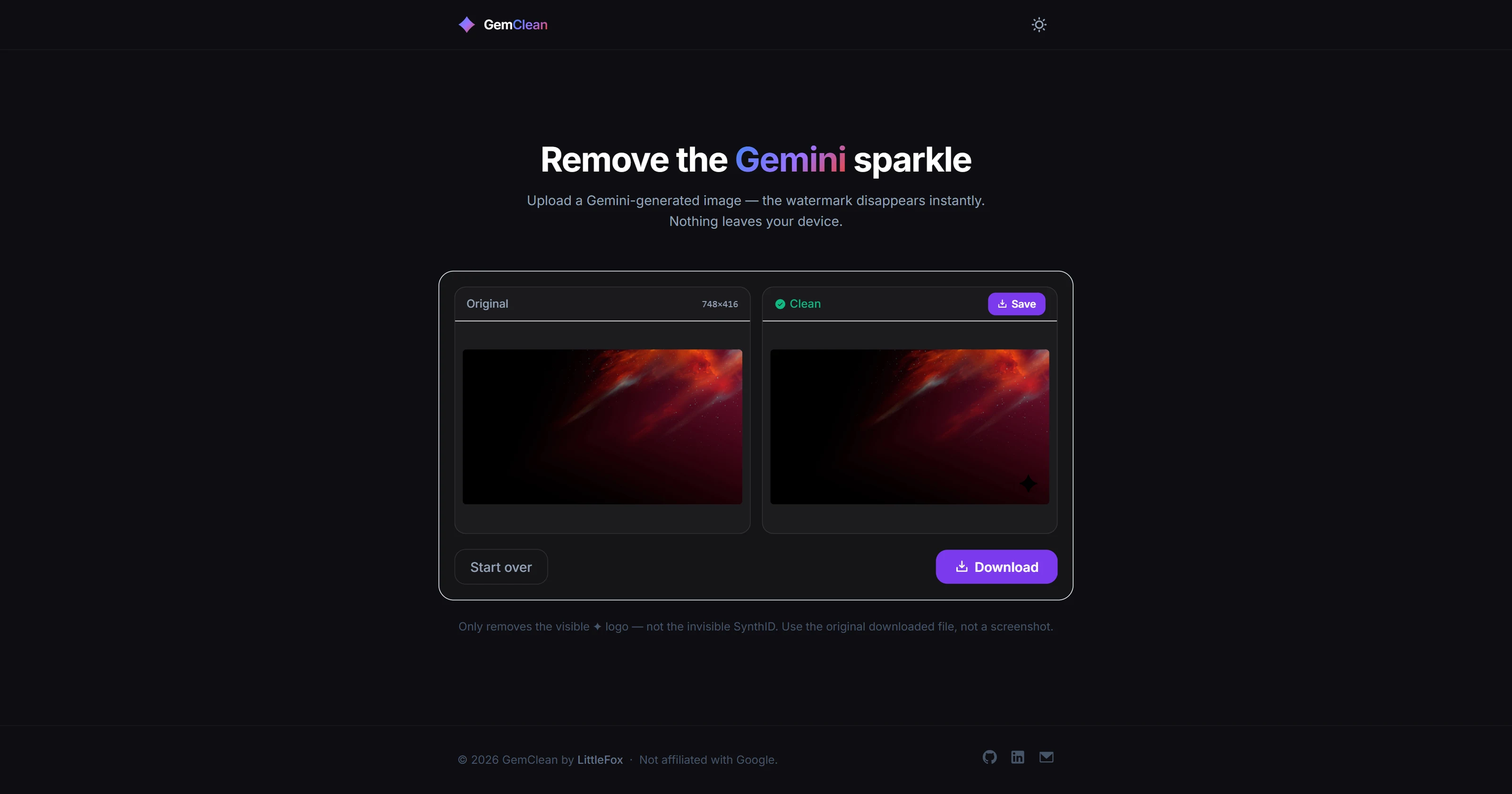
GemClean does one thing with mathematical precision: it removes Google Gemini's sparkle watermark from generated images by inverting the exact alpha blending operation Gemini uses to composite it. No AI, no guessing, no quality loss — just pixel arithmetic run entirely inside your browser.
Overview
When Gemini generates an image, it composites a sparkle watermark at a known opacity using standard alpha blending. The formula is deterministic and reversible. GemClean reads each affected pixel, applies the inverse calculation, and writes the original color back — all via the Canvas API, all offline, all in milliseconds.
The tool auto-detects whether the watermark is 48px or 96px (Gemini uses both sizes depending on the output resolution), handles batch drops of multiple files at once, and packages results as a ZIP for convenient download.
Every image you drop into GemClean stays on your device. There are zero network requests after the page loads. The processing runs entirely in the browser using Canvas API pixel manipulation — nothing is transmitted anywhere.
How It Works: The Algorithm
Alpha blending composites a foreground color F onto a background color B at opacity α like this:
Output = α × F + (1 − α) × BGemini's watermark is composited at a fixed, known alpha. If you know Output, F (the watermark sparkle color), and α, you can solve for B — the original pixel — algebraically:
B = (Output − α × F) / (1 − α)GemClean applies this formula per channel (R, G, B) for every pixel within the watermark bounding box. Because the math is exact, the restoration is lossless — no estimation, no blur, no smearing.
src/core/reverse-blend.js
/**
 * Restores the original pixel color by inverting alpha blending.
 * @param {number} output - Composited channel value (0-255)
 * @param {number} fg     - Watermark channel value (0-255)
 * @param {number} alpha  - Watermark opacity (0-1)
 */
export function reverseAlphaBlend(output, fg, alpha) {
  return Math.round((output - alpha * fg) / (1 - alpha))
}
The watermark region is located by checking the known pixel offset from the image corner, then the full bounding box is processed in a single getImageData / putImageData pass — no per-pixel Canvas reads in a loop.
Features
| Feature | Details |
|---|---|
| Reverse Alpha Blending | Exact pixel restoration using inverted compositing math — no heuristics |
| Fully offline | Zero network requests after page load; no data ever leaves the device |
| Batch processing | Drop multiple files at once; all are processed in parallel |
| Sub-second processing | Completes in milliseconds even on 4K images — no chunking or workers needed |
| ZIP download | Batch results packaged with JSZip and downloaded in a single click |
| Auto-size detection | Identifies 48px vs 96px watermark variant automatically |
| Dark / light mode | Follows system preference; no external theming library |
| Zero build step | Ships as plain HTML + Tailwind CDN + ES modules; open the file and it works |
Tech Stack
| Tool | Role |
|---|---|
| Vanilla JS (ES6 Modules) | Core algorithm and Canvas API orchestration |
| Canvas API | getImageData / putImageData for pixel-level read/write |
| Tailwind CSS | UI styling via CDN, no build step needed |
| JSZip | In-browser ZIP generation for batch downloads |
| Iconify | On-demand SVG icons loaded from CDN |
Repository Layout
GemClean/
├── assets/
│   ├── bg_48.png      # Alpha reference — images ≤ 1024 px
│   └── bg_96.png      # Alpha reference — images > 1024 × 1024 px
├── js/
│   ├── alphaMap.js    # Builds Float32 opacity map from reference PNG
│   ├── blendModes.js  # Reverse alpha-blend formula
│   ├── engine.js      # Pipeline orchestrator
│   └── app.js         # DOM, drag-and-drop, download logic
└── index.html
Processing Pipeline
File drop or selection
User drops one or more image files onto the drop zone. The File API reads each file as an ArrayBuffer and passes it to the processing queue.
Watermark size detection
The image dimensions are checked against a 1024px threshold to select the correct reference. Two bundled reference PNGs (bg_48.png, bg_96.png) — screenshots of the isolated watermark — are drawn to an off-screen canvas on first load. Each pixel's max channel value is normalised into a Float32Array, giving a per-pixel floating-point opacity map accurate enough for lossless restoration.
Reverse alpha blend
A <canvas> element is created off-screen at the image's native resolution. getImageData() extracts the full pixel buffer. For each pixel within the watermark bounding box, the reverse blend formula is applied per channel and the result is clamped to the valid [0, 255] range.
Export
canvas.toBlob('image/png') produces the restored image. Single files trigger an immediate download. Batch runs accumulate blobs into a JSZip archive and download the ZIP when all files are done.
Running Locally
ES6 module imports require a local HTTP server — opening index.html directly via file:// will fail due to CORS.
# Python
python -m http.server 8080

# Node
npx serve .
Then open http://localhost:8080 in any modern browser.
GemClean removes the visible sparkle logo only. It does not strip Google's invisible SynthID metadata embedded in the image. Always respect the Terms of Service of the original image generator.